
Win bigger projects. Keep 100% of the job.
Homeowners, property managers and realtors post renovation and repair projects on Genie. Claim the lead for a flat fee, send a professional itemized quote, get it signed in the app — and get paid directly by your client.
Get project leadsSee plans & pricing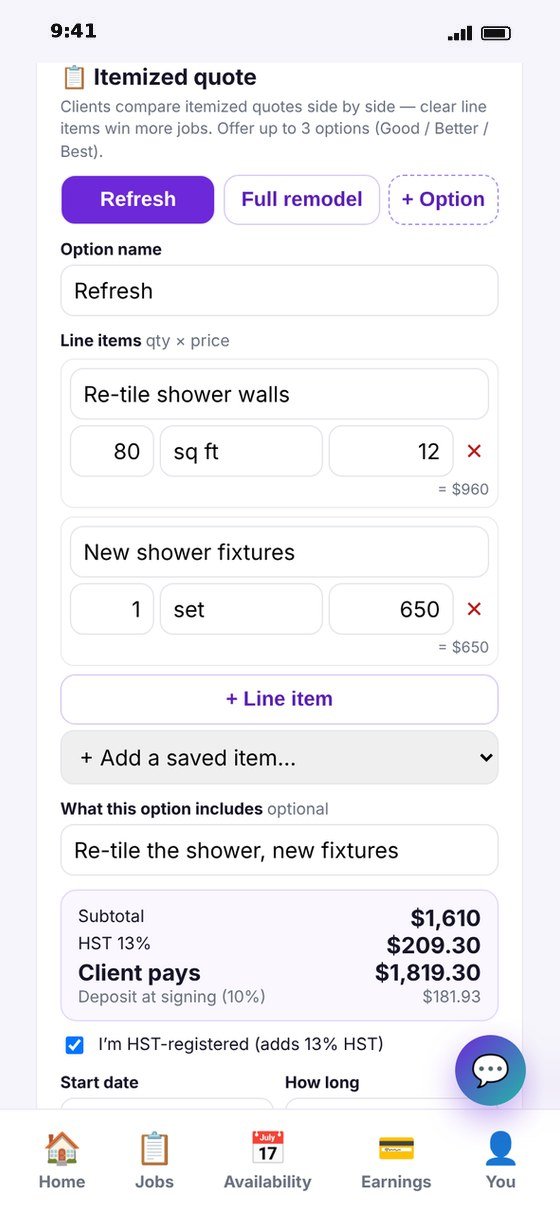
From request to signed contract — in one app
Everything a project needs, without paying for another subscription.
Get matched
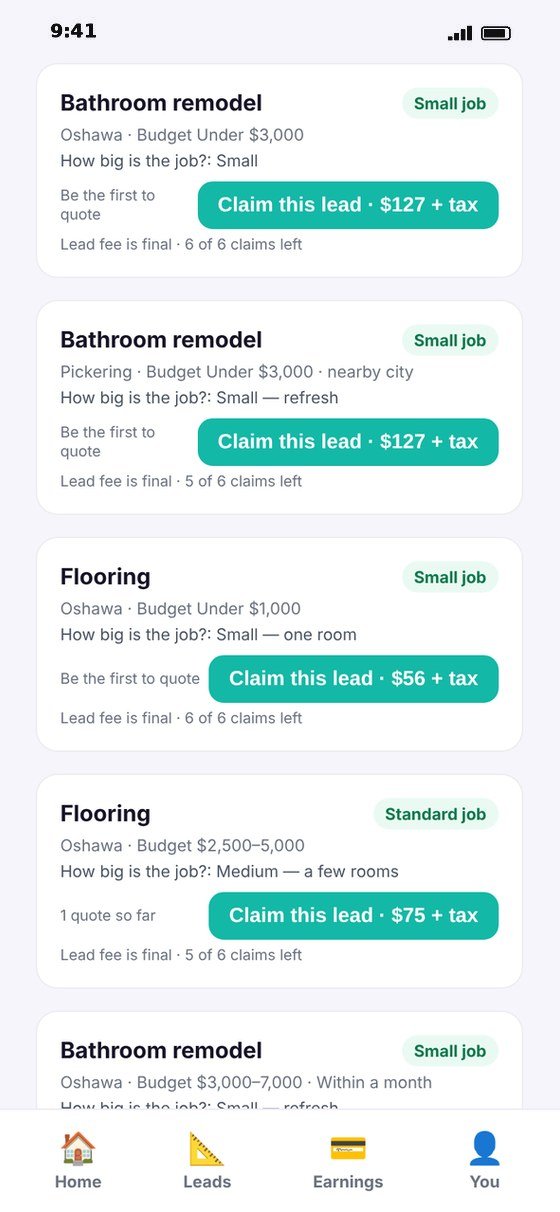
Projects in your trade and area — with photos, size, budget and timing. You see the lead fee before you claim it.
Send an itemized quote
Line items, quantity × price, HST, up to 3 options (Good / Better / Best), deposit, start date and warranty — within 24 hours.
Stand out with ✓ badges
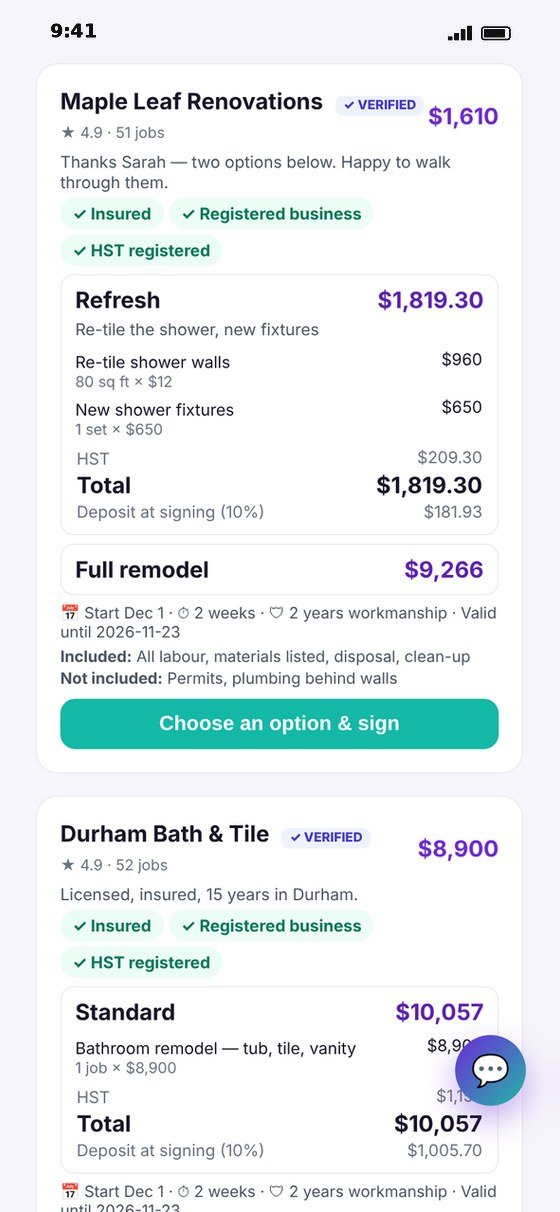
Clients compare quotes side by side. Your insurance, business number, HST number and licence show as ✓ badges.
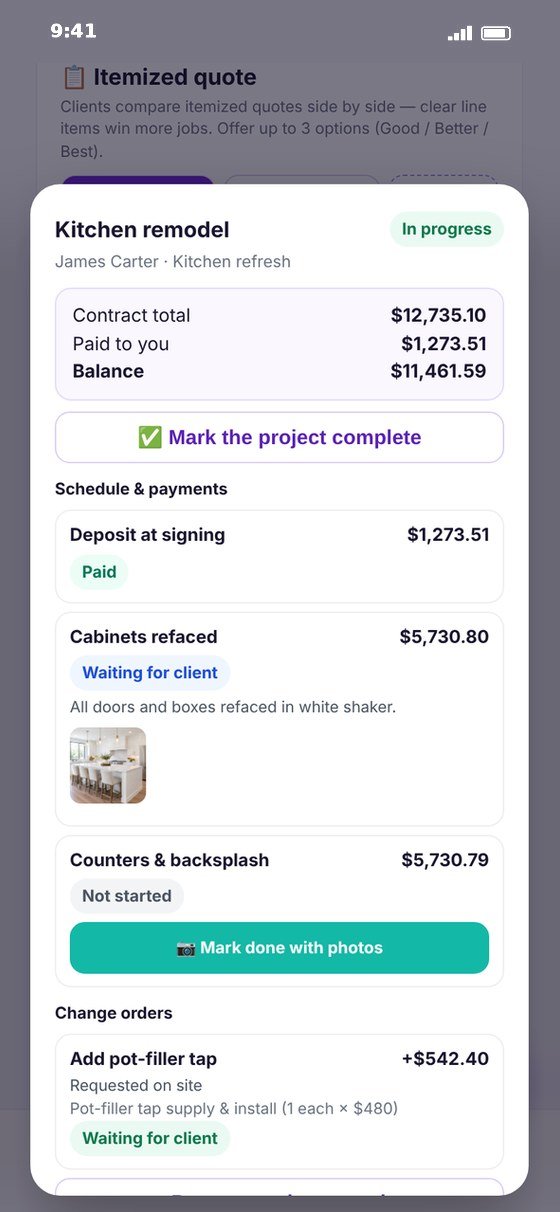
Sign and run the project
The client signs in the app, you countersign. Stages, change orders, payments you record and the invoice stay in one place.
Clear quotes. Signed contracts. Clients who pay you directly. No commission.
Why contractors choose Genie
Built for trades who want good jobs — not another bill every month.
Pay per lead, nothing else
A flat fee to claim a lead. No membership, no monthly plan and no cut of the job.
Real, local jobs
Projects posted by homeowners, property managers and realtors near you — with photos, budget and timing, so you know what you’re quoting.
Quotes that win
Clients compare line by line. The clearest quote with options usually wins the job.
Contracts written for you
Ontario requires a written agreement for renovation work over $50. Genie creates it, with the client’s rights included.
Change orders, signed
Extra work is approved and signed by the client before you do it — no more “I never agreed to that”.
Reviews that count
Verified reviews only from projects that were actually completed — they follow you to every quote.
A home screen built for contractors
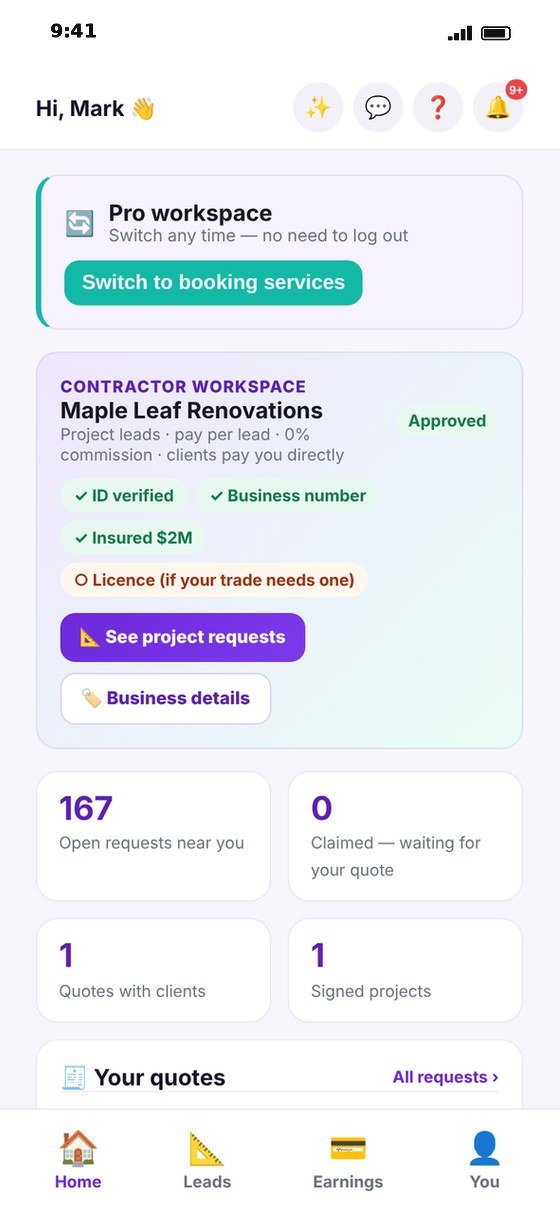
Contractors get their own workspace — no on-demand jobs, no hourly shifts, no availability calendar. Just your projects.
- Open requests near you and spots waiting for your quote
- Every quote you’ve sent and where it stands
- Signed projects with the next thing to do
- Your verification status: ID, business number, $2M insurance, licence
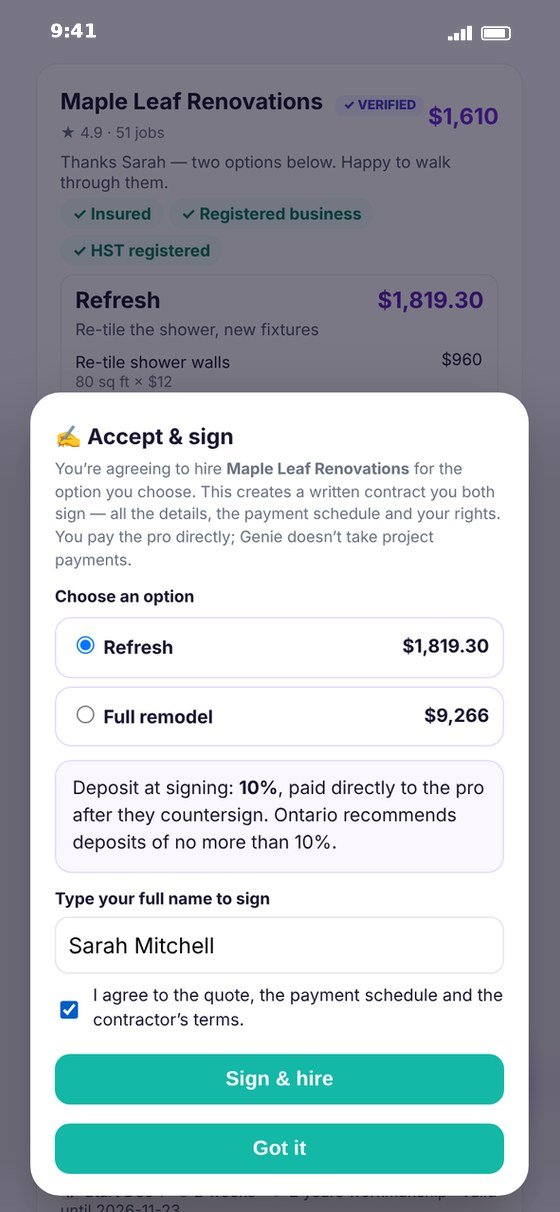
Accept & sign — a real contract, in the app
The client picks an option and signs with their name; you countersign.
- Work, price, taxes, payment schedule and start date
- The client’s rights under Ontario’s Consumer Protection Act, 2002
- Deposit guidance built in (Ontario recommends no more than 10%)
- A printable contract and invoice — save as PDF any time
Owner approval in one link
Working with a property manager or realtor? They send your quote to the owner or their client in one link — the owner approves the option they want, and you get a faster yes.
- No app or account needed for the owner
- The approval shows on the project instantly
- Perfect for rentals, condos, pre-listing repairs and move-outs

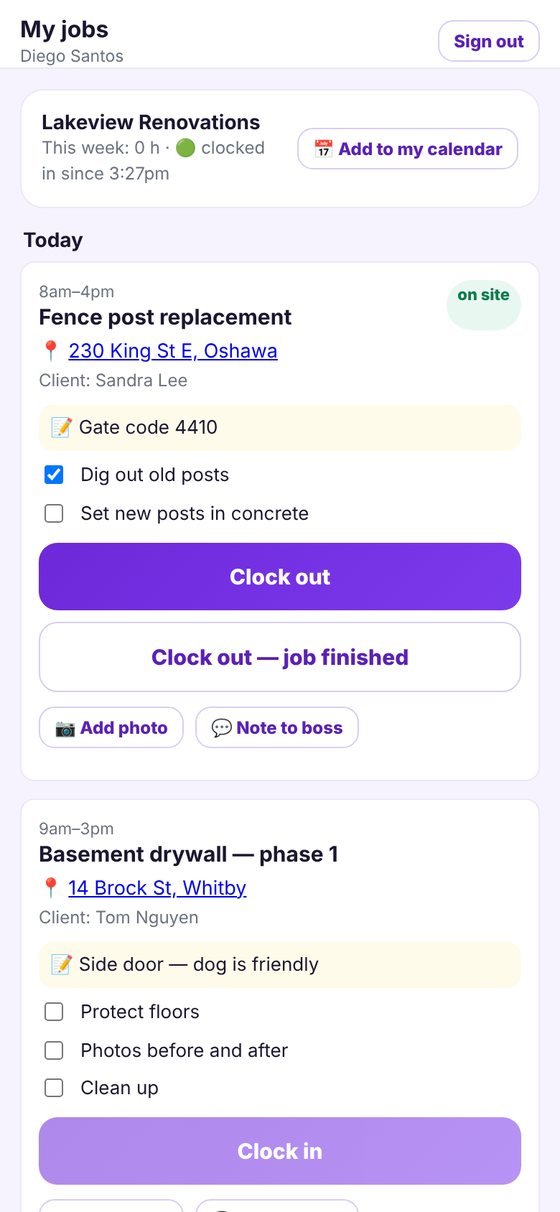
Your crew sees their day — and clocks in
Invite workers by phone or email. They get a free crew login — no Genie sign-up or verification for your projects — and see only the jobs you assign them.
- Today’s jobs with the address, your notes and a checklist
- Clock in and out — hours go straight to your job costing
- Photos and notes back to you from the site
- Each worker’s own calendar feed for Google, Apple or Outlook
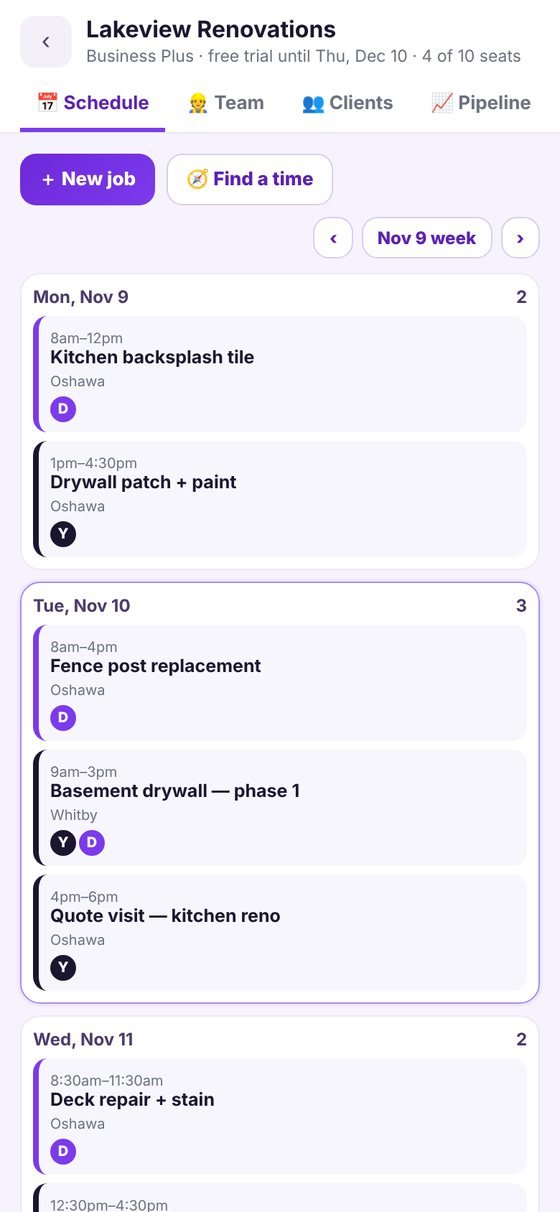
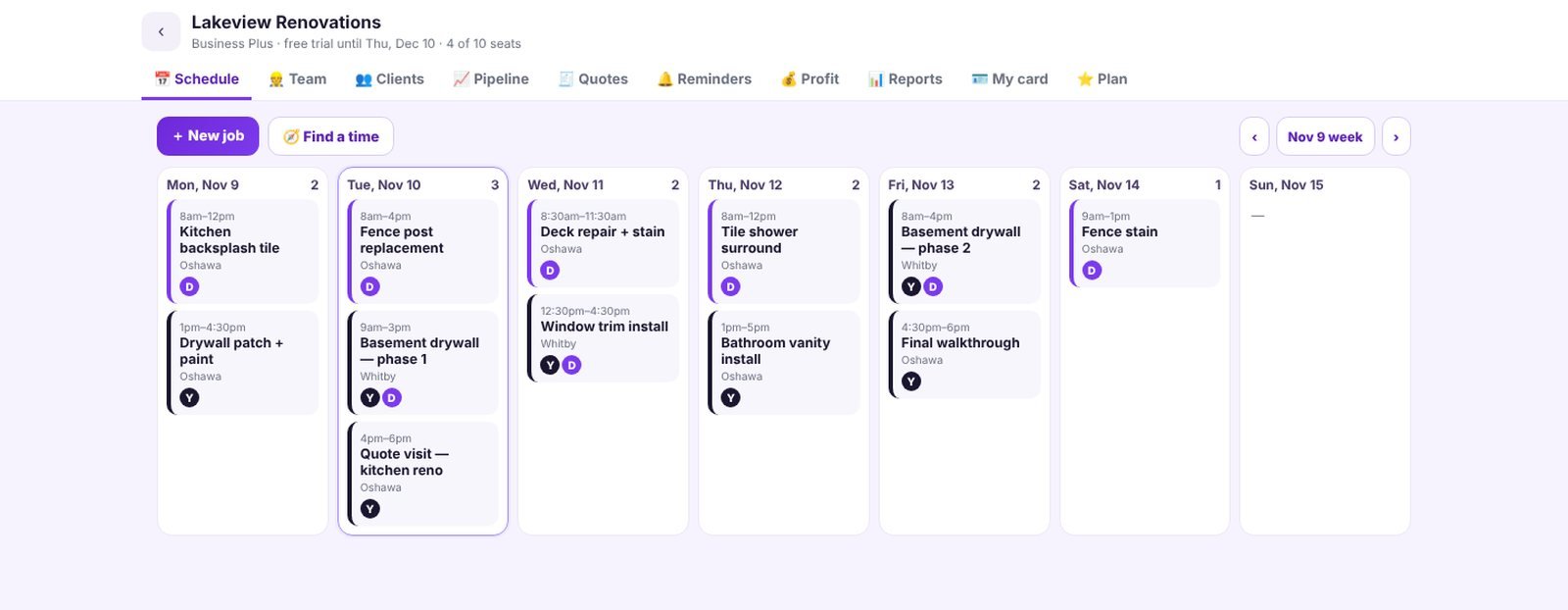
Schedule smarter with “Find a time”
Genie checks who’s free, keeps crews close to their other jobs that day, skips holidays and warns you when bad weather is coming for outdoor work.
- Week view of every job and who’s on it
- Double-bookings flagged before they happen
- Workers notified the moment you assign or move a job
- See who’s on site right now
Every client and every quote, in one place
Genie leads and your own clients side by side: claimed → quoted → opened → signed → in progress → paid. We tell you who to follow up with.
- Know when a client opens your quote — automatic follow-ups after 3 and 7 days
- Send quotes to your own clients; they sign online, no account needed
- Import your client list from a spreadsheet
- Notes and the full history of your work with each client
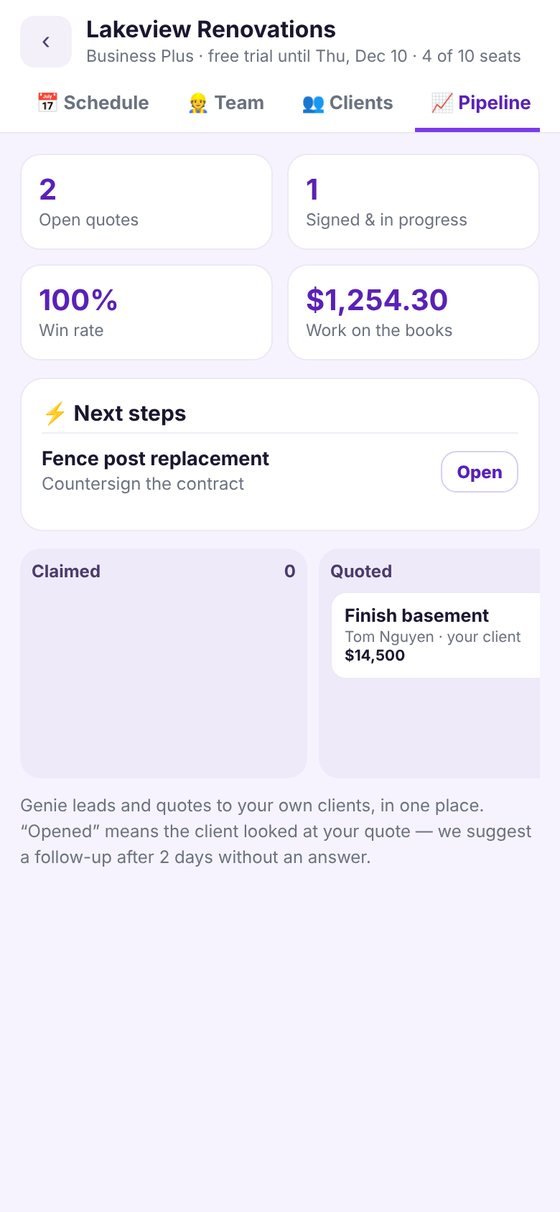
Past clients remember you — on time
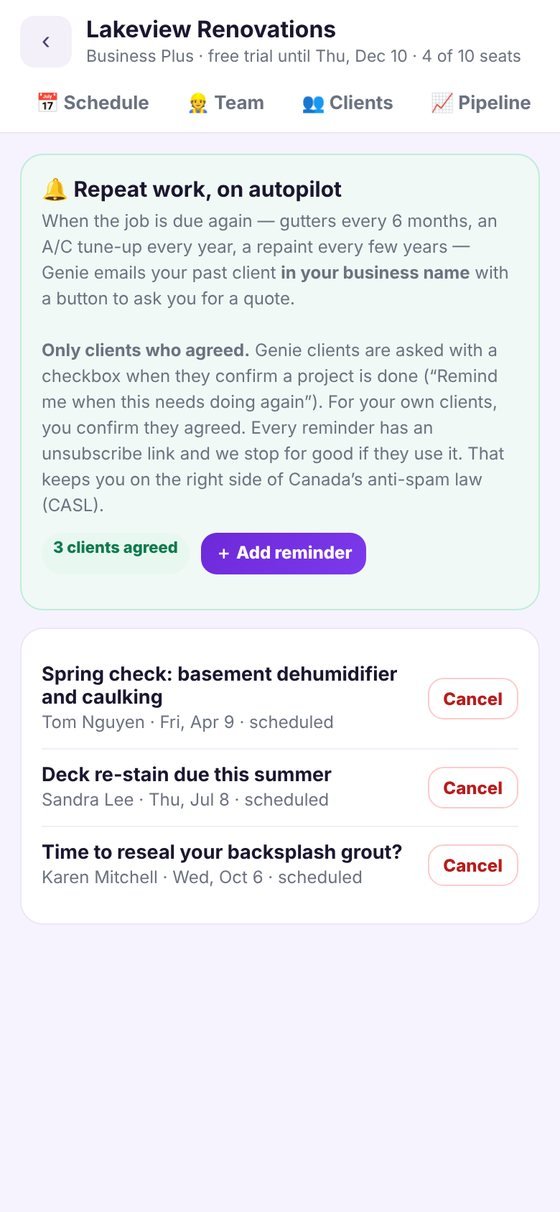
When the job is due again — gutters every six months, an A/C tune-up every year, a repaint every few years — Genie emails your past client in your business name with a button to ask you for a quote.
- Only clients who agreed: a checkbox when they confirm the project is done, or your confirmation for your own clients
- Unsubscribe link in every reminder — built to follow Canada’s anti-spam law (CASL)
- Clients never have to share their home records with you — you see only your own work
Quote from the truck, run the business from the office
Everything works on a computer too — your schedule, crew, clients and quotes on a big screen.
Start free. Add Business when your crew grows.
Every plan includes project leads at the same flat fees, itemized quotes, signed contracts and 0% commission. Prices in CAD, plus HST. Yearly = 2 months free.
Leads
- Project requests in your trade and area
- Itemized Good / Better / Best quotes
- Signed contracts, change orders, invoices
- Your contractor card and verified reviews
Business
- Everything in Leads
- Sales pipeline — included, not an add-on
- Crew app — free login per seat
- Schedule with “Find a time” + calendar feeds
- Client CRM — client list, notes, history and pipeline
- Automatic quote & balance follow-ups
- QuickBooks-ready exports
- Quotes & contracts for your own clients
- Job checklists, photos and crew time tracking
- Repeat-work reminders (with consent)
- Free client import from your spreadsheet
Business Plus
- Everything in Business
- Job costing — materials, subs, receipts and each person’s hours
- Insights dashboard and monthly reports
- Profit alerts and high-value quote alerts
- Monthly sales goal tracking
Company
- Everything in Business Plus
- Custom seats and pricing
- Help setting up your team and clients
30-day free trial, no card needed. Cancel any time — your data is kept. Genie never handles your job money: clients pay you directly, with your own payment provider or e-transfer.
Project leads — what they cost
The same on every plan. You see the lead fee on every request before you claim it.
| Genie project leads | |
|---|---|
| Lead fee | $25–$249 + HST, one time, based on job size: Small $25 · Standard $59 · Large $99 · Major $199 · Premium $249 |
| Commission on the job | 0% — the client pays you directly |
| Monthly subscription | None needed for leads — Business plans are optional |
| Quotes, contracts, change orders, invoices | Included |
| Time to quote | 24 hours after you claim the lead |
Lead fees are final once you claim a lead. Genie connects clients with independent contractors and does not collect or hold project payments.
Job software you pay for every month vs. Genie
Most job-management apps charge per user to organize the clients you already have — and push their own card processing. Genie brings you new clients and runs your crew, schedule, quotes and contracts, at a flat price.
| Genie Business | Typical job-management software | |
|---|---|---|
| New clients | ✓ Verified project requests near you | ✗ You find your own |
| Price | ✓ Flat: $39/mo for 3 people, $89/mo for 10 · free to join with pay-per-lead | Per-user plans and paid add-ons that grow with your team |
| Crew app for workers | ✓ Free login per seat — workers don’t register or get vetted for your projects | ✓ Usually, per user |
| Scheduling with “Find a time” | ✓ Free people, nearby jobs, holidays and weather | ✓ On higher plans |
| Quotes, signed contracts, change orders | ✓ Included, with Ontario consumer-protection terms | Varies by plan |
| Sales pipeline | ✓ Included in Business | Often a paid add-on |
| Client CRM and automatic follow-ups | ✓ Included — quotes and balances, in your business name | Often on higher plans |
| QuickBooks | ✓ QuickBooks-ready exports of customers, invoices, payments and hours | Sync on most plans |
| Repeat-work reminders | ✓ In your name, consent-based, CASL-ready | Often a paid marketing add-on |
| Getting paid | ✓ Keep your own payment provider — no processing markup, no lock-in | Often their own card processing, with fees on every payment |
| Commission on your jobs | ✓ 0% | Card-processing fees on payments |
| Verified reviews on every quote | ✓ From finished projects only | ✗ Not a marketplace |
Comparison based on publicly listed features of popular field-service apps; features and prices vary by provider and plan.
What you need to get project leads
$2M liability insurance
Commercial general liability of at least $2 million, on file and current — required to quote.
A registered business
Your business number (BN). Add your HST number if you’re registered.
Licence where required
For example ESA for electrical or TSSA for gas — shown as a ✓ badge.
Owner ID check
A quick ID check of the business owner — done once, in the app.
Want on-demand jobs too?
Turn them on any time in your business settings — they have a few extra checks.
A card for lead fees
Charged only when you claim a lead. No other fees.
Common questions
How much does a project lead cost?
A one-time fee based on the size of the job — from $25 for small jobs to $249 for the largest renovations, plus HST. You see it before you claim it.
Does Genie take a commission on the job?
No. Genie charges the lead fee only. The client pays you directly — e-transfer, cheque or your own payment link — and you keep 100% of the job.
Is there a monthly subscription?
Not for leads. Joining is free and you pay only for leads you claim. The Business plan ($39/mo, or $390/yr) and Business Plus ($89/mo, or $890/yr) are optional — for running your crew, schedule and clients in Genie. Both start with a 30-day free trial, no card needed.
How do seats work?
A seat is one person on your team, including you. Business includes 3 seats and you can add more for $9/month each, up to 10. Business Plus includes 10 seats and extra seats are $7/month each, with no limit.
I have more than 10 people — what then?
Business Plus covers any size: 10 seats included, then $7/month per extra person. For 25 or more people we also set up a Company plan with you — tap “Talk to us” in the app.
Do my workers have to register with Genie or be verified?
No. For your own projects, workers just get a free crew login from your invite — no Genie registration, background check or payout account. They see only the jobs you assign them. (Genie’s on-demand jobs are different: everyone on those must be a verified Genie pro.)
How do I pay my crew?
However you already do. Your clients pay you directly and you pay your crew at the rates you agreed — Genie never touches project money. On Genie on-demand crew jobs, you can choose “Business crew” so your team members’ shares are paid to you.
Can my past clients get reminders from me?
Yes, on the Business plan — when they’ve agreed. Genie asks clients with a checkbox when they confirm a project is done; for your own clients, you confirm they agreed. Every reminder has an unsubscribe link. Clients never share their Home Passport with you: you only see your own work with them.
Does it work with QuickBooks?
Yes. Download your customers, invoices, payments and crew hours as files QuickBooks Online imports (Settings → Import data). Your QuickBooks account stays yours — there’s nothing extra to pay Genie for it.
Can I cancel any time?
Yes. Cancel in the app — your plan runs to the end of the period you paid for and your data is kept. Lead fees are separate and work the same on every plan.
Will I get on-demand or hourly jobs?
Not unless you want them. Contractors who join for project leads only see project requests. You can turn on on-demand jobs later in your business settings.
What does the client see when I quote?
An itemized quote: line items (quantity × price), up to three options, HST, the total, the deposit, start date, duration, warranty, what is and isn’t included, and ✓ badges for your insurance, business number, HST number and licence.
How do I get paid?
Directly by the client. Split the job into stages; when you mark a stage done with photos and the client approves it, that payment is due to you. Record payments you receive and Genie keeps the invoice up to date.
Can property managers and realtors use it?
Yes. They can send your quote to the owner or their client in one link; the owner approves the option they want.
Looking for your trade?
Win your next project on Genie
Free to join. 0% commission. Business tools when you want them.
Get project leads